


Recently, my team was conducting research on the potential clients’ pain points, and they came across the Qualtrics’ 2026 Consumer Experience Trends Report. Based on a survey of over 20,000 consumers across 14 countries, the research found that nearly one in five companies that used AI for customer service saw no benefit at all. That failure rate was almost four times higher than AI’s failure rate in other consumer applications. And to my surprise, customer service AI ranked the worst for convenience, time savings, and usefulness.
Despite that, the top-down pressure on customer service leaders to roll out AI is the same as at the beginning of the year (according to Gartner’s research), if not greater. And though I well understand the rising frustration with unhelpful AI chatbots and other automation tools, both among businesses and their customers, I don’t think it’s the right time to give up on this solution.
After running 43 AI deployments at EverHelp across SaaS, e-commerce, and fintech clients, I can say with reasonable confidence that it’s rarely the model quality at fault for such failures. The actual culprit is how teams allocate their effort when working with these models. To me, the problem is that most spend 90% of their time and energy picking out the tool and just about 10% on organizing a proper training for it.
The problem nobody wants to talk about
As I was doing research for this article, I accidentally found myself in the depths of Reddit communities talking about AI in customer service. Most posts (like the one below) were wondering the same: can AI really be helpful, or is it just hype?

Funnily enough, many people in the comment sections, especially those who already shipped AI for support, kept circling back to the same answer: the tech works when you give it good inputs. And the uncomfortable truth is that for one reason or another, most companies don’t.
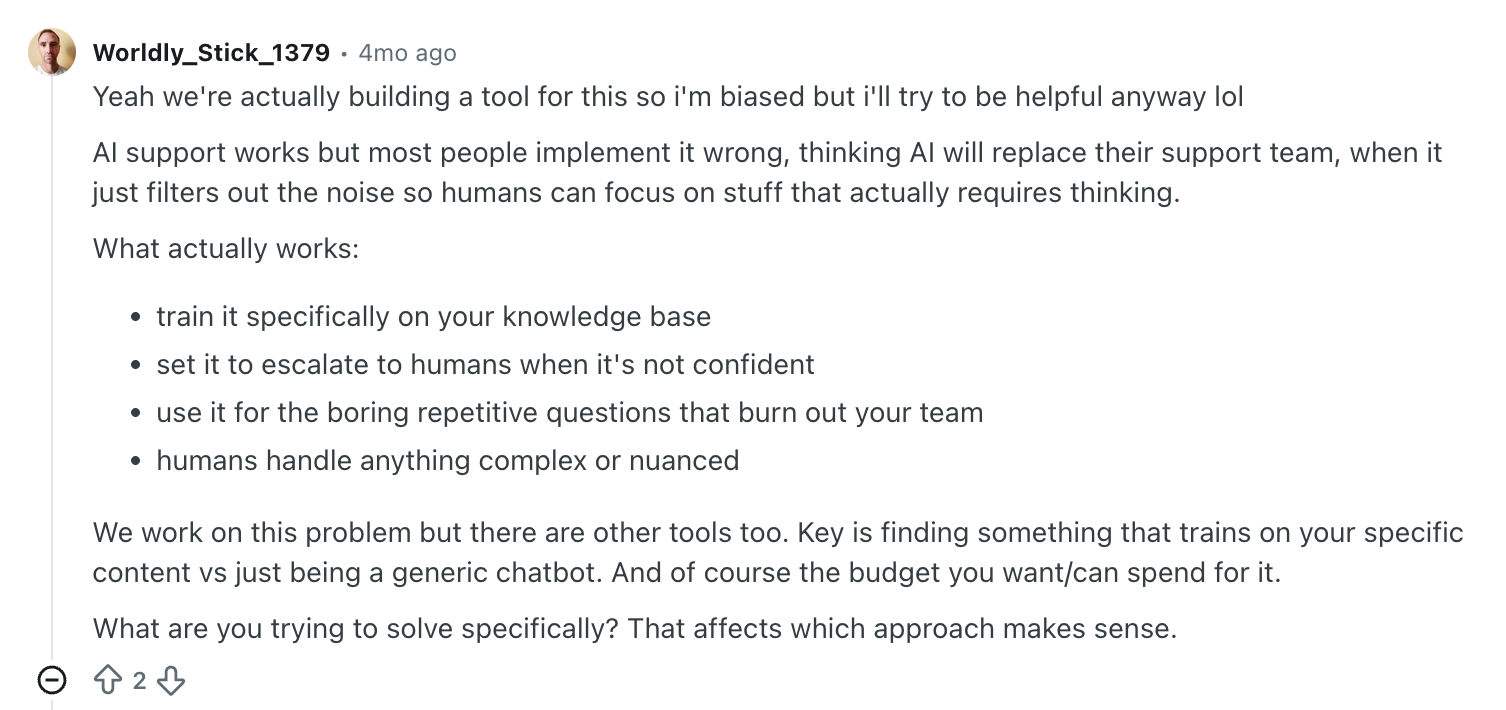
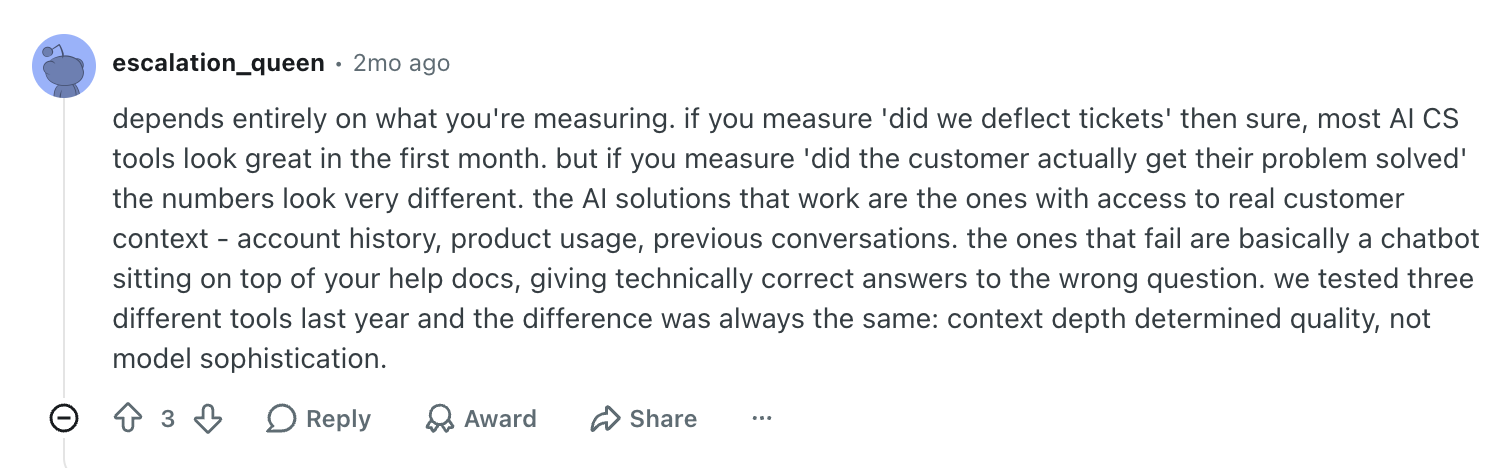
There was another comment that I would probably tape above every CX leader’s desk this year.
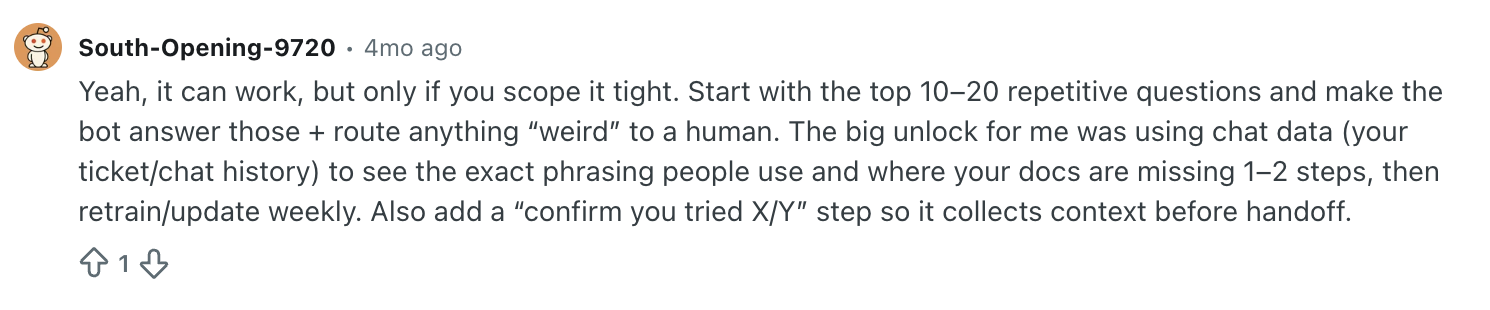
Notice how the solution they found wasn’t some specific vendor, tool, or model. What helped was just their own data.
We’ve seen it ourselves at some of the kickoffs with EverHelp clients. The training materials companies bring into an AI rollout (knowledge bases, Notion workspaces, help-center articles) usually fall into one of three buckets:
- Some are unorganized, with duplicates and contradictions sitting side by side in folders nobody curates.
- Some are just out of date: refund policies from 2022, pricing pages still referencing a discontinued plan, troubleshooting steps for a UI that shipped a redesign last spring.
- Others, however, are simply incomplete, mostly because the senior agents already have everything in their heads and don’t feel the need for elaborate instructions.
But AI needs access to the exact information your customers typically look for. Otherwise, if you plug AI into any of these, it will just provide inaccurate responses (though very quickly, we must admit) and feed into growing customer frustration.
The Examples of Knowledge Base Failures
As previously mentioned, we first learned about the importance of a detailed knowledge base through AI integration for our clients.
- During testing for one client, our AI offered a 30% “VIP recovery discount” to a first-time shopper asking a routine question about coupons. That discount was meant exclusively for customers who had formally escalated complaints. The information was in the shared knowledge base, flagged as internal, and the AI processed it anyway. That’s when we learned that index boundaries are king.
- An earlier client came to us after their last AI solution told a customer to contact their bank for a chargeback rather than processing a standard refund. Apparently, the documentation it learned this from was a deprecated policy that nobody had updated since 2022.
- Another bot revealed itself mid-conversation by writing, “Escalating this issue to a human.” Customers who thought they were already talking to a person got confused and suspicious. No one had thought to specifically instruct the AI to stay in character. And, according to research from OnePoll, after such a situation, 53% of customers would lose their trust to the brand.
We all know that the stakes are too high when it comes to losing customers. In today’s oversaturated market, they are hard to acquire and even harder to retain. Fortunately, there’s a way to keep both your AI chatbots, helping you do triage and overtake the 1st Line of support and customers, bringing you revenue. And the major step is “cleaning” your data.
What is considered to be “messy data”?
“Messy” knowledge bases have caused many rollouts to fail, and companies are already starting to invest real money to fix the issue. Just in that Gartner’s survey we talked about earlier, it was found that 58% of customer service leaders are planning to retrain support agents into knowledge management specialists whose main job is reviewing and curating what the AI delivers. Just like us now, they’ve figured out the documentation is what makes or breaks the bot, and they’re paying humans to keep it usable.
A logical conclusion is that high performing teams should always audit their data before jumping straight into AI customer service deployments. Here’s what you can fix to make sure the responses provided by your automated agents aren’t a gimmick or a hallucination:
- Unarchived but outdated articles
- Surface-level guides or user information
- Internal agent documentation heavy with jargon
- Duplicate or contradictory entries
- A shared knowledge base for both internal and external use
- Missing descriptions for popular (and not) edge cases
The AI Copilot model: not a magic pill, but definitely a solution
This leads us to the framing that I believe is the only solution to the current epidemic of unhelpful AI bots: the AI Copilot model. Following this work framework, rather than treating AI as a human replacement that can be unboxed and pointed at the customer, we treat it as an assistant whose main goal is to make the work of human agents more manageable.
How does it work?
The AI pulls the information from a curated and audited knowledge base and drafts its response based on it. A human agent then reviews the draft and either:
- Sends it as is if everything is correct.
- Or edit it first, if something needs to be corrected.
As such, your support representatives can focus more on brand tone, emotional context of the message, and a proper judgment, rather than surfing through the knowledge base trying to find the necessary paragraph.
What does this change?
From our own experience, we specifically saw a boost in productivity, as one of our clients reported the ticket processing speed to increase x3. Across some projects, we also saw an increase in CSAT scores, especially when compared to only-AI or only-human models.
| Channel | Average CSAT |
| Humans alone | 47.6% |
| Standard bot | 58.8% |
| AI agent with curated KB and human oversight | 64.0% |
We can make a case that the AI agent outperformed humans because it had instant access to clean, structured, current knowledge, while human agents had to switch between tabs and contexts, all under the pressure of a growing ticket volume.
It’s also worth noting that the quality control score for the AI agent landed at 92%, matching our best human agents. This is yet again just another proof that poor AI performance is less about the model and more about how you train it. And I will elaborate more on what you can do to make your AI work right.
Lessons we learned from 43 deployments, so you don’t have to
So, as we already have our fair share of AI implementation fails and lessons learned the hard way, it would only be fair to share it with the audience.
1. Separate your AI knowledge base from internal systems
It’s simple: if information shouldn’t reach a customer, it shouldn’t be in the same indexed environment your AI pulls from. We usually build a dedicated external knowledge base for our clients, mostly including:
- structured product docs
- customer-language FAQs
- troubleshooting guides
- and current policies.
What should be excluded are coaching notes, pricing exceptions, and escalation playbooks.
2. Run continuous feedback loops so your AI can be better
Though some AI does learn from a support context, just like humans, it needs pointers to know what to fix. As an option, you can introduce a two-layer monitoring system:
- 1st layer → automated pattern checks that catch the easy mismatches, like the AI saying “2–3 days” when policy actually reads “3–5 business days.”
- 2nd layer → a human agent reads the AI responses where something went wrong in terms of tone or process handling, for example, flags it, and sends it back with correction notes.
3. Map your escalation triggers before the AI goes live
The most common failure is deploying AI without formal rules for when to bring in humans. Define all the potential triggers upfront, for example:
- Technical questions outside AI’s KB
- Conversations with strong emotions (you can outline emotionally-charged keywords for AI to pay attention to)
- Legal terminology and compliance cases
- Cases regarding sensitive personal information (e.g., billing disputes, account closures, security incidents).
- Requests for exceptions
Building the trigger library takes a few weeks of going through past tickets to find the real cutoffs, which costs much less than cleaning up after a customer goes public to bash the brand.
4. Start at 30% automation, then earn the rest
I’ve watched several teams try to flip their entire support function to AI on day one, usually because someone above them set an aggressive target. 80% automation in the first quarter is the classic ambition. We’ve worked with a couple of those projects after the fact, and the pattern repeats:
The AI starts solving edge cases it shouldn’t be handling → complaints spike → he team rolls everything back within six months.
That’s why our default starting point is closer to 30% and only on those more mundane tickets that are safe to automate. These can be:
- product/service information queries
- order status checks
- password resets
- shipping windows
The volume of those tickets is usually so high that it completely justifies the rollout, and we get a few months of clean data showing what the AI can and cannot do before we move to automating the next tier. Then you just add a new ticket type to AI’s scope, watch the satisfaction metrics, and expand again. This way, you can reach a steadier automation rate that will stick.
What does this mean if you’re under pressure to ship AI in 2026
If you’re in the 91% of CS leaders being told to implement AI this year, the temptation is to start with vendor demos. I’d push back on that. The harder work is auditing what you have for the system to train on.
Pull a few hundred of your recently resolved tickets (the ones your team handled well) and check how often the answer came from your actual documentation versus how often someone had to ping a senior agent on Slack. Whatever percentage is lived in your docs is the ceiling on the accurate responses an AI bot will deliver, regardless of which one you buy.
The key takeaway here is to take the time to prepare the materials and train the AI as you would any other agent on your team. That’s the only way it can a) help your customers and b) work alongside your agents.